
































.svg)


























.svg)












Kevin Gemeroy
Kevin is founder and president of Dynamic Computing. For more than two decades, he has been a trusted technology partner for Seattle-area businesses and nonprofits.
Who We Are
Industries
Solutions
Service Areas
Resources
If you’ve been paying even casual attention to the world these days, you’ve probably noticed that artificial intelligence (AI) is everywhere. It’s chock full of promises like smarter workflows, new tools, and a whole new era of efficiency.
But for many small and mid-sized businesses, AI can also feel overwhelming. What is it, really? What problems can it actually solve? How do you take advantage of the benefits without creating new risks?
Since we work with organizations across Seattle and the Puget Sound region that are trying to answer these questions, we’ve put together this AI 101 guide, breaking down what you need to know. That way, you can make informed decisions about how the technology fits into your business — if at all.
Before we talk about tools and benefits, let’s level-set on what AI means.
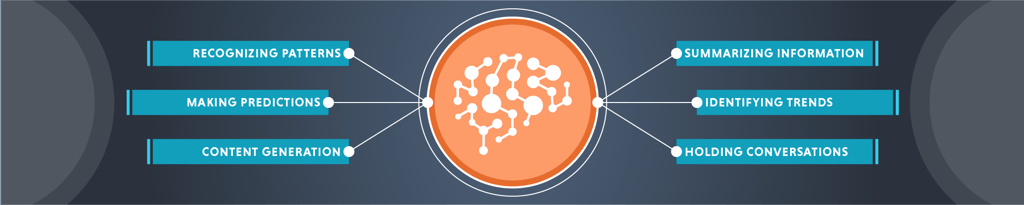
AI is a set of technologies that allow computers to perform tasks that normally require human intelligence. That includes recognizing patterns, making predictions, generating text or images, summarizing information, identifying trends, and even holding conversations.
Under the hood, most modern AI tools rely on either machine learning or a large language model. The more data they see, the better they get at recognizing patterns and producing accurate results.
But here’s the important part: AI isn’t magic. It doesn’t “think” like a human, and it doesn’t understand context the way people do. It finds patterns in data and uses those patterns to predict or produce outcomes.
When you understand this, AI is easier to work with and to manage responsibly.
As AI moves beyond experimental tech and into everyday business operations, some tools you’re already using — your email spam filter, for example — are powered by smart AI models behind the scenes.
Some other common AI use-cases include:
Importantly, these tools don’t replace human judgment, but they can reduce time spent on repetitive communication tasks.
The goal in using AI for these types of things is to let employees spend more time on work that truly matters.

While AI is often talked about in big-tech terms (massive corporations, billion-dollar data centers, etc.), some small and mid-sized businesses actually have the most to gain from its adoption and use.
Take time savings, for example. AI can take repetitive tasks off your team’s plate. That could mean anything from drafting an email to reviewing data to generating a quick first-pass marketing outline. Even saving each employee 30 to 60 minutes a day adds up quickly.
AI tools can also help small teams get instant insight into data that used to take hours or days to digest. For leaders wearing many hats, this can dramatically increase the speed of decision-making.
Then there’s the cyber security component, where AI-powered detection tools can help identify attacks early and reduce the risk of breaches — something that’s increasingly critical when small and mid-sized businesses are becoming prime targets.
But let’s be clear, adopting AI has some substantial risks as well. Here’s what to keep in mind before you roll new tools into your environment
Many AI tools process data in the cloud, which means you may be sending sensitive information outside your own environment. Not all platforms keep data private or separated from other users, and some even use your inputs to help train future models.
Because of this, it’s critical to understand exactly what you’re putting into any AI tool before you use it. Know what data you’re sharing, where that data goes, how it’s stored, and who can access it on the other end.
This level of awareness is especially important if your organization handles sensitive information like financial data, health records, or proprietary business information.
Using AI tools doesn’t automatically make your organization more secure. In many cases, businesses need to take deliberate steps to configure these tools properly. That can include changing default privacy settings, restricting who can use specific features, setting clear policies about what data cannot be entered into AI systems, controlling how models integrate with email or file storage, and regularly monitoring access logs to spot unusual activity.
Misconfigurations remain one of the top causes of AI-related data exposure today, which makes thoughtful setup and ongoing oversight essential.
AI sometimes produces incorrect — or entirely fabricated — answers. These are commonly called hallucinations, and they’re a real risk if teams rely too heavily on the output.
The golden rule to follow is simple: AI should assist humans, not replace human review.
Shadow AI — when your employees use AI tools without your knowledge — can quickly result in a number of issues.
Sensitive data may unintentionally leak into unapproved platforms, internal processes can become less consistent, and overall security risks rise as information spreads outside controlled systems. Compliance also becomes harder to manage when you don’t know which tools people are using or what data they’re sharing.
That’s why it’s essential to get in front of this with a clear, well-communicated AI usage policy that sets expectations, protects your data, and ensures everyone is using these tools responsibly.
As platforms like Microsoft 365 continue to integrate AI into nearly every application, businesses need to think strategically about how these tools fit into their workflows.
That includes deciding which users actually need AI licenses, understanding how AI will interact with internal data, ensuring the right security controls are in place, and planning budgets accordingly to avoid surprises.
Navigating all of this can get complicated quickly, which is why partnering with an experienced IT provider can make a significant difference. They can help you make informed decisions, configure tools securely, and ensure you’re getting real value from your investment.
AI is not going away. The genie can’t be put back inside the bottle.
So the question isn’t whether your business will use AI, it’s how you’ll use it and whether you’ll do so thoughtfully and securely.
If you want help navigating the options, selecting the right tools, or securing your environment, we can guide you through every step of the process.